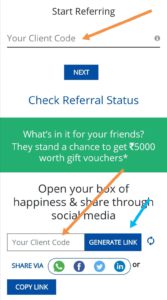
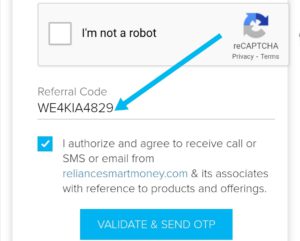
Reliance Smart Money referral code – WE4KIA4829. Apply the code while creating an account and refer and earn shopping vouchers. The maximum you can refer is 5.
Requirements to open a Reliance Smart Money demat account
- Pan card
- Aadhaar card linked with mobile number
- Bank passbook (front page)
- Signature on white paper
- Passport-size photo.
How to apply Reliance Smart Money referral code
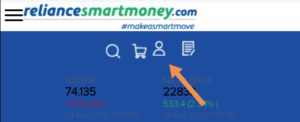
1. Click on the profile icon and then select ” Don’t have a user ID? Option.
2. On the next page, enter your Email, mobile number, PAN card, date of birth, and finally enter the Reliance Smart Money referral code – WE4KIA4829.

If you’re joining Reliance Smart Money just for referring friends. Similar to this, there are some other Demat account refer and earn apps. Upstox earns 500 for each referral. 5paisa: you will get 550 worth of Nifty Bees. Angel one get 500 rupees worth digital gift card. Same as Reliance Smart Money also, check Dhan and Multipl
3. On this page, fill in your mother’s name, marital status, education qualification, and annual income.
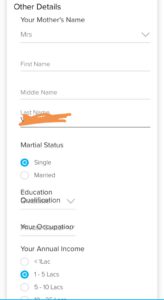
4. Scroll down the page; you need to fill in some more details. You can fill in these details according to you.
5. Your trading experience/ investment experience. I have selected no experience.
6. Next, political connection. I don’t have any political connections. So I have selected no.
7. Last step: Residence for tax purposes outside India. I am from India; I stay in India. So selected no.
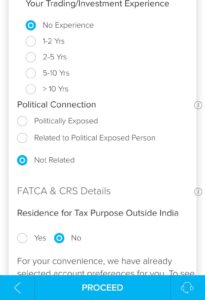
8. click on proceed. In the next step, you have to select the products you’re interested in, Reliance Smart Money.
9. They will charge you according to your selection or by using their products. (Select only what you need).
10. By default, they will show some stocks; I have deselected all. I won’t trade just for writing this article; I am creating an account.
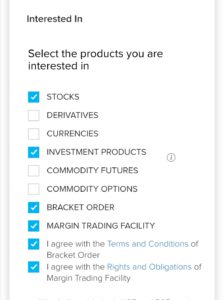
11. Proceed to the next page. Here you have to submit the non-receipt of the POA. On the next page, agree to their privacy policy.
12. Here you have to upload your PAN card image and bank proof (the main front page of the passbook). And the signature on paper.
13. Some users have to upload their address proof. (You can upload your Aadhaar card front and back, or select any other documents).
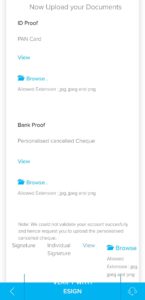
14. Finally, click on ESIGN. Immediately, a pop-up will appear: I hereby authorize e-GOV on behalf of Reliance Securities Limited.
15. Agree to this and click on eSign. It will be redirected to the NSDL page. Here you have to enter your Aadhaar number and click on Send OTP.
16. Verify it with the OTP.

I got an issue here. Again, it returned to the documents upload page. Just ignored it. After a few hours, of reliance smart money executive helped me to verify documents.
reliance smart money refer and earn
1. Within a few hours, you will receive your user ID and password. Log in with that.
2. On the home screen, you can see a banner: Refer friends and earn Rewards. Click on that

3. You will be redirected to another page. On this page, you have to enter your client ID ( client ID means you have received it after creating an account along with your password). Enter that.
4. If you enter your client ID in the top option. You have to fill in your friend’s name, email ID, and phone number.
5. If you enter your client code in the option below. You will get a link. Share the link with your friends.